CAT 2026 registration numbers are out. According to IIM Indore, 2.84 lakh candidates have registered for CAT 2026. Last year, 2.95 lakh candidates registered for CAT 2025. Hence, CAT 2026 registration numbers are 11,000, or 3.73%, lower than last year’s figures. IIM Indore opened the CAT 2026 registration process on August 3, 2026. The extended last date for CAT form filling was September 22, 2026. For the first time in the history of the CAT exam, the official fee payment window was extended by two days, until September 24, 2026, at 5:00 PM. According to MBAUniverse.com’s analysis of past CAT registration trends, the highest number of candidates registered for the CAT exam in 2024, when 3.29 lakh candidates registered. Check CAT registration trends for the last 20 years in the table below. Candidates should now seriously prepare for CAT Exam on Nov 29, 2026 by using free expert resources on MBAUniverse.com: CAT 2026 Preparation Guide, CAT Mock Tests 2026 and CAT Sample Papers 2026. Explore all other MBA entrance exams with registrations open including XAT 2027, SNAP 2026, NMAT 2026. For Reference, read this step-by-step guide that covers the CAT registration 2026 direct link, dates, fees, documents required, the form-filling process, common mistakes to avoid, and a lot more. CAT 2026 exam will be held on Sunday, November 29, 2026 in three shifts.
CAT 2026 Registration Last Date: Conducted by one of the top IIMs every year by rotation, Common Admission Test (CAT) is the largest MBA entrance exam for MBA admission in 22 IIMs and other top B-schools. CAT 2026 Registration last date was September 22. CAT 2026 Fee Payment Window is closed as the last date was September 24, 5:00 PM. The CAT registration fee 2026 was Rs 2,700 for General/EWS/NC-OBC and Rs 1,350 for SC/ST/PwBD candidates. CAT 2026 fees payment by UPI is free, but online bank payments attract charges.
Check important events and their dates in the CAT schedule 2026 table below:
Generic CAT : CAT 2026 Exam Dates & Schedule - 2026
| Event | Date |
|---|---|
| CAT Notification Release Date | July 26, 2026 |
| CAT Registration Start Date | August 03, 2026 (10:00 am) |
| CAT Registration Last Date (Closed) | September 22, 2026 (5:00 pm) |
| CAT 2026 Fee Payment Window (Closed) | September 24, 2026 till 5:00 PM |
| CAT Form Correction Window | October 5 (10:00 AM) to October 6 (5:00 PM) |
| CAT Admit Card Release Date | November 4, 2026 |
| CAT Exam Date | November 29, 2026 (Confirmed) |
| CAT Answer Key Release Date | December 3, 2026 (Expected) |
| CAT Result Release Date | December 23, 2026 (Expected) |
According to IIM Indore, 2.84 lakh candidates have registered for CAT 2026. Last year, 2.95 lakh candidates registered for CAT 2025. Hence, CAT 2026 registration numbers are 11,000, or 3.73%, lower than last year’s figures. IIM Indore opened the CAT 2026 registration process on August 3, 2026. The extended last date for CAT form filling was September 22, 2026. For the first time in the history of the CAT exam, the official fee payment window was extended by two days, until September 24, 2026, at 5:00 PM.
It should also be noted that only about 2.50 lakh candidates are expected to appear for CAT 2026, as approximately 12% of registered candidates typically do not take the exam. For example, 2.95 lakh candidates registered for CAT 2025, but only 2.58 lakh appeared, representing a decline of 12.5%.
Earlier, unconfirmed reports on social media claimed that total CAT 2026 registrations had crossed 3.20 lakh. MBAUniverse.com had cautioned candidates to wait for official data released by IIM Indore. With IIM Indore releasing the figures, we now know how many candidates registered for CAT 2026. A total of 2.84 lakh candidates registered for the CAT 2026 exam.
According to MBAUniverse.com’s analysis of past CAT registration trends, the highest number of candidates registered for the CAT exam in 2024, when 3.29 lakh candidates registered. Check CAT registration trends for the last 20 years in the table below.
MBAUniverse.com Exclusive: 20-year CAT Registration Trend Data
| CAT Year | Registered Candidates | Appeared Candidates |
|---|---|---|
| 2026 | 284,000 | 2,50,000 (Expected) |
| 2025 | 295,000 | 258,000 |
| 2024 | 329,000 | 293,000 |
| 2023 | 328,000 | 288,000 |
| 2022 | 255,501 | 222,184 |
| 2021 | 229,969 | 191,660 |
| 2020 | 227,835 | 190,144 |
| 2019 | 244,169 | 209,926 |
| 2018 | 240,338 | 209,405 |
| 2017 | 231,067 | 199,632 |
| 2016 | 232,434 | 195,679 |
| 2015 | 218,664 | 179,602 |
| 2014 | 196,988 | 170,000 |
| 2013 | 194,516 | 173,714 |
| 2012 | 214,000 | 195,000 |
| 2011 | 205,000 | 186,000 |
| 2010 | 204,000 | 185,000 |
| 2009 | 241,000 | 230,000 |
| 2008 | 290,000 | 276,000 |
| 2007 | 250,000 | 230,000 |
| 2006 | 191,000 | 180,000 |
| 2005 | 170,000 | 155,000 |
CAT 2026 registration direct link was available on CAT official website www.iimcat.ac.in till September 22, 5 PM and is now closed.
CAT Registration Direct Link 2026: https://cdn.digialm.com/EForms/configuredHtml/32842/101262/Registration.html
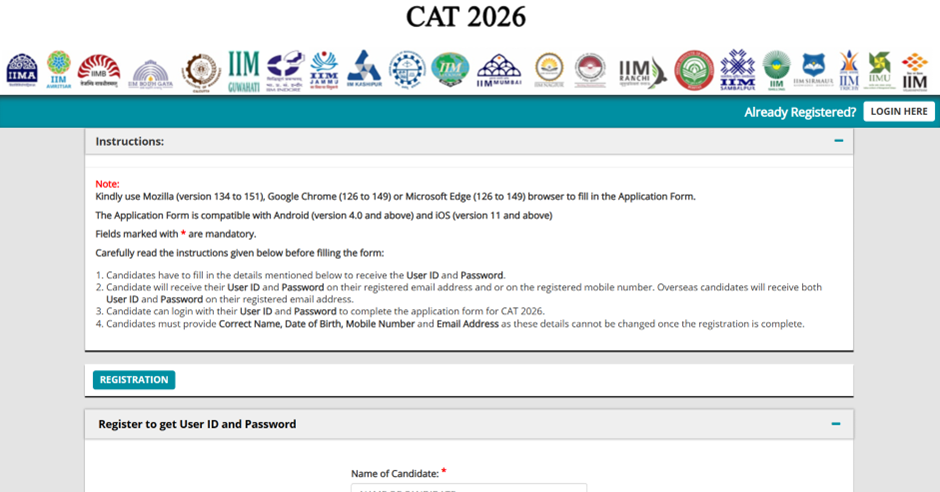
CAT Registration Fees in 2026 is increased from last year. CAT examination registration fees is Rs 2,700 for General/EWS/NC-OBC candidates. CAT registration 2026 form fees for SC/ST/PwD categories is Rs 1,350. For comparison, CAT 2025 registration fees was Rs 2,600 for General/EWS/NC-OBC candidates and Rs 1350 for SC/ST/PwD category candidates. Candidates should note that the CAT Registration 2026 Fees includes admission applications for all the 22 IIMs in India. No separate IIM application fees is charged. However, candidates have to pay separate application for applying to non-IIM B-schools.
The official CAT 2026 notification was released on July 26, the last Sunday of July, by IIM Indore. CAT notification 2026 was published on the official CAT website and as advertisements in major newspapers. It contains all important details about CAT exam, such as eligibility criteria, exam dates, the application process, the syllabus, the exam pattern, and other important details.
Candidates should read the notification carefully to understand the registration process, CAT 2026 exam date, and required documents before the application window opens on August 3, 2026.
CAT Eligibility Criteria 2026
Before you begin the CAT 2026 registration process, it is essential to verify that you meet the eligibility criteria set by IIMs. The CAT 2026 eligibility criteria cover educational qualifications, category-wise minimum marks, and reservation policies. Importantly, there is no age limit and no restriction on the number of attempts.
CAT 2026 Eligibility Criteria: Key Requirements
Criteria | Requirement |
|---|---|
Educational Qualification | Bachelor's degree (any discipline) from a recognised University |
Minimum Marks (General/EWS/NC-OBC) | 50% or equivalent CGPA |
Minimum Marks (SC/ST/PwD) | 45% or equivalent CGPA |
Final-Year Students | Eligible (Provisional admission until degree is obtained) |
Professional Degree Holders | Eligible — CA, CS, ICWA (CMA), Fellow of the Institute of Actuaries of India (FIAI) with required percentage |
Age Limit | No age limit |
Number of Attempts | No restriction |
Nationality | Indian citizens; Foreign nationals may apply (check IIM-specific criteria) |
CAT 2026 Reservation Policy is followed by IIMs which require reservation for SC, ST, NC-BC, EWS, and PwBD candidates. For complete category-wise eligibility requirements, supporting documents, and reservation rules, read CAT Eligibility Criteria 2026 on MBAUniverse.com.
CAT 2026 Registration last date is over on September 22 (5:00 PM). CAT 2026 Fee Payment Window is extended till September 24, 5:00 PM. This will be open only for candidates who have registered for CAT exam on September 22. Read more details in the article below. Check how to fill CAT Application Form 2026 for reference below. CAT registration 2026 process can be completed by following these simple steps:
Step 1: Register for User ID and Password
The first step towards CAT exam registration is to visit the CAT official website iimcat.ac.in and register for getting your User ID and password.
Step 2: Login to CAT Website
After receiving your User ID and password, the next step towards CAT registration is to login to CAT website and enter the same to login to your account.
Step 3: Complete CAT Form Filling Process
How to fill CAT Exam Form? To complete the CAT registration 2026 process, CAT Application Form filling can be completed by filling these details:
- PERSONAL DETAILS
- ACADEMICS
- WORK EXPERIENCE
- PROGRAMMES
- TEST CITY
- DECLARATION
CAT 2026 Registration last date is over on September 22 (5:00 PM). CAT 2026 Fee Payment Window is extended till September 24, 5:00 PM. This will be open only for candidates who have registered for CAT exam on September 22. Read how to register for CAT exam for reference below.
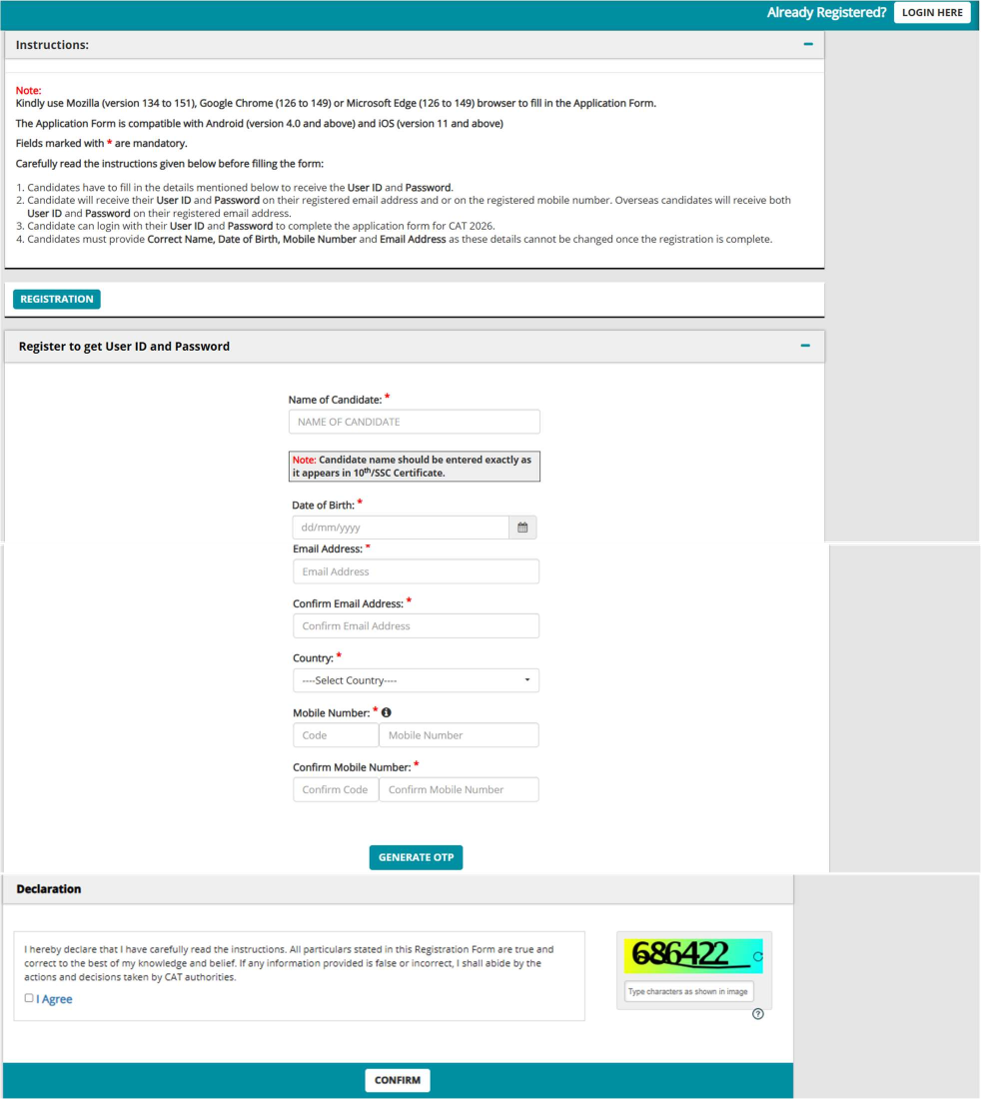
The first step towards completing CAT registration 2026 is to visit CAT 2026 registration website - iimcat.ac.in. Click the ‘Register’ button under New Candidate Registration header to create your user profile. The Registration form window will open in your browser. The registration form to create your User Profile appears as shown below. To complete the registration process, generate the OTP by clicking on “GENERATE OTP” button. You will be redirected to CAPTCHA to fill and submit the OTP received on your mobile for verification. Candidates should remember that entries on this form cannot be changed once submitted, hence, please ensure that you enter the required information correctly.
Enter following details to complete new registration for CAT 2026:
- Name of Candidate: This should be the same as it appears in 10th/SSC Certificate.
- Date of Birth: Use the calendar icon to select the correct date.
- Email Address: Should be valid and unique. You will receive your User ID on this email address only (Overseas candidates will receive both User ID & Password on this email address only).
- Mobile Number: Should be valid and unique. You will receive an OTP to verify your mobile number and your Password as an SMS on this number only.
o India based mobile number should have 10 digits.
o Mobiles from other countries should be prefixed with the respective country code. Special characters such as (0), +, - are not allowed.
OTP
To complete the registration process, generate the OTP by clicking on the Generate OTP button. You will be redirected to CAPTCHA to fill and submit. To verify the mobile number, enter the OTP received and click on “Validate the OTP” tab. After validation, you will be able to submit the registration form, and candidate will receive the User ID and Password on the registered email address and on the registered mobile number. Overseas candidates will receive both User ID and Password only on registered email address.
CAPTCHA
The CAPTCHA box (as displayed above) is a special set of characters displayed on the screen. You will have to retype the characters displayed in the box provided. If you have trouble reading the characters, click the ‘Get new image’ link to refresh the characters.
DECLARATION
By selecting the ‘I Agree’ checkbox in the Declaration section, you are committing to be honest and fair in all your actions and that the information provided in the CAT 2026 Registration Form is correct and true. Providing wrong information can lead to the cancellation of your right to appear in the examination or to be considered for the admission process as mandated by the appropriate authority. It is mandatory to agree to the contents in the Declaration to proceed to submit the form.
CONFIRMATION OF REGISTRATION
Within minutes of submitting the Registration Form, you will receive your Login Details on the registered email address from the administrator with the subject line Registration Successful for CAT 2026. Ensure that you check your mailbox immediately. If you do not receive the email within a reasonable period, please check your spam folder.
You will also receive the Login Details as an SMS on the registered mobile number from sender IIMCAT (not applicable for overseas candidates). Using these credentials, you may proceed to complete your application for CAT 2026 by clicking on the link given in the email. You may also log in from the CAT 2026 Website. This marks the completion of Step 1 of the Registration Process.
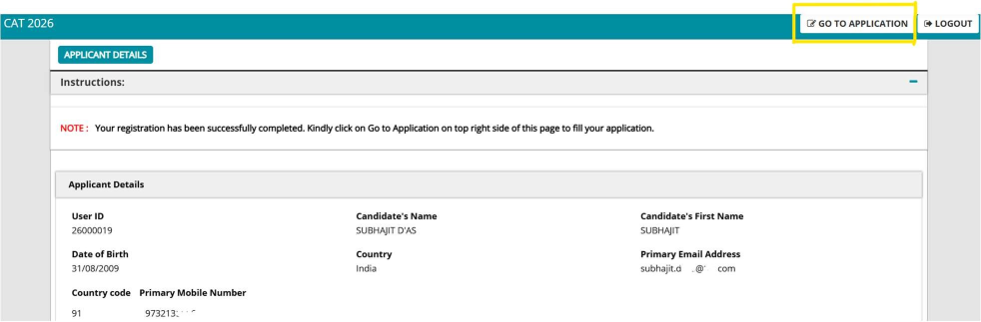
The second step towards completing CAT registration 2026 is to use the User ID and Password (received at the completion of Step 1 above) to login as a “Registered Candidate” on the website and fill the CAT Application Form 2026. After logging in, you will be redirected to the Applicant Details page. The Applicant’s personal details will be displayed on this page. Next to Personal Details, a link “GO TO APPLICATION” is available. Click this link to go to the application page.
This is the main step for completing CAT registration 2026. CAT Application Form filling is categorized into the following six sections:
- PERSONAL DETAILS
- ACADEMICS
- WORK EXPERIENCE
- PROGRAMMES
- TEST CITY
- DECLARATION
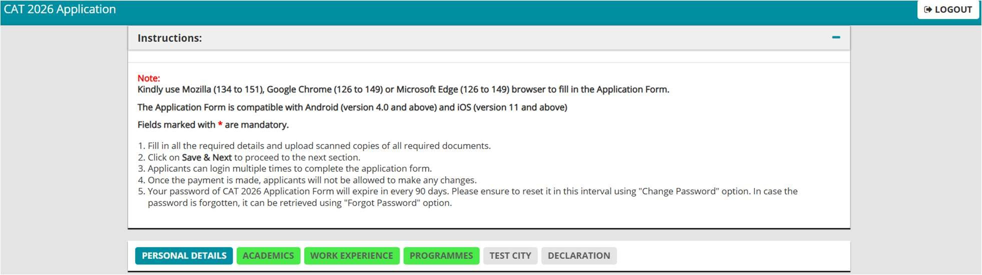
Before you begin filling the information, read the instructions at the start of the form. After you complete the last section, i.e., Payment, your application for CAT 2026 will be considered complete and you will receive a confirmation mail. After this, changes to any information provided on the application form is not possible. You can only print or save the form. Details are available on the application submission page.
A short overview of how you can fill CAT entrance form is given below. Read CAT 2026 Application Form Filling Guide for more details.
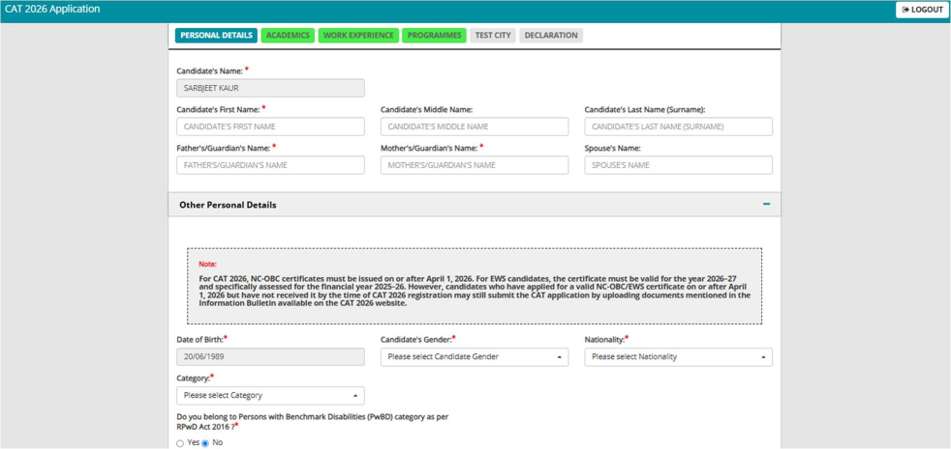
Enter Personal Details
The first step in CAT form filling is to enter and verify your personal details. Enter following information to complete your personal details required in this step:
- Candidate’s First Name, Middle Name, Last Name
- Father’s/Guardian’s Name and Mother’s Name/Guardian’s Name
- Spouse’s Name (if married)
- Date of Birth
- Gender
- Nationality
- Category
Candidates should select category details from the drop-down menu. If you are not selecting “General Category”, then you will be required to add supporting documents such as Caste/Tribe Certificate etc. Check list of category supporting documents required for CAT entrance form below.
Communication/Permanent Address: After adding personal details, candidates should add their Communication/Permanent Address. Enter your both present and permanent postal address details correctly, as it will be used for communication during the admission process. You need to provide an alternate Email Address and emergency Mobile Number while filling up the Application form.
Next, candidates have to Upload Required Documents, given below, to complete personal details:
- CAT Photograph specifications: Recent passport-size photograph (not older than 6 months), white background, 1200×1200 pixels (or higher resolution at minimum 150px/inch), clear image. The same photograph will be required on the admit card on exam day — keep sufficient copies. Acceptable formats: .jpg or .jpeg.
- Signature: Upload the scanned image of your signature within the dimensions of 80mm X 35mm. The documents file format should be a .jpg or .jpeg and the file size should not be more than 80KB.
- Valid EWS/NC-OBC/SC/ST Certificate: If applicable, upload this certificate. Scan as PDF document to upload it.
- Valid PwBD Certificate: If applicable. Scan as PDF document to upload here.
Refer image of CAT 2026 application form below. After entering your personal details and uploading the required documents, click on “SAVE & NEXT” button to proceed to the next section.
Enter Personal Details
Enter Academic Details
In this section, you should enter following educational qualification details carefully:
- SSC/10th/Equivalent Exam Details: Enter Name of the Board, Year/Month of completion, Maximum Marks, Total Marks Obtained, Aggregate Percentage. Enter similar details for following qualifications.
- HSC/12th/Equivalent/Diploma Exam Details
- First Bachelor’s Degree Details
- Master’s Degree Details
- Professional Degree Details
Refer image of CAT 2026 application form below. Click on “SAVE & NEXT” button to proceed to the next section.
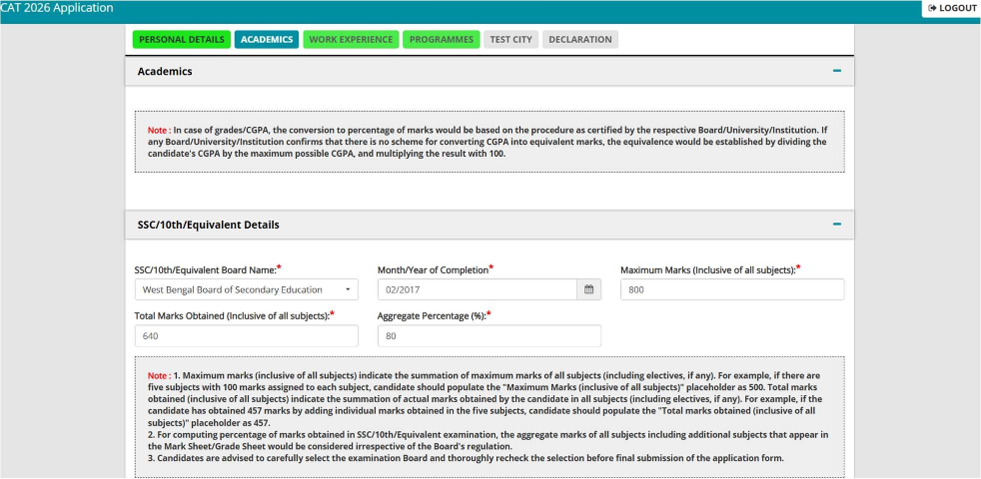
Enter Work Experience
If you are a candidate with work experience, enter your experience details as on July 31, 2026. Enter following details for each of your work experiences:
- Name of Organization
- Start Date
- End Date
- Break in Experience (In days)
- Experience (In days)
Remember, only Full-time experience after graduation must be entered. Do not enter Part-time/ Project/ Internship/ Article ship/ Pre-graduation work experience as it will not be counted as work experience by IIMs for MBA admission. Break in Experience if any, needs to be entered in days in the text box provided. If there is no break, please enter “0” and proceed.
Refer image of CAT 2026 application form below. Click on “SAVE & NEXT” button to proceed to the next section.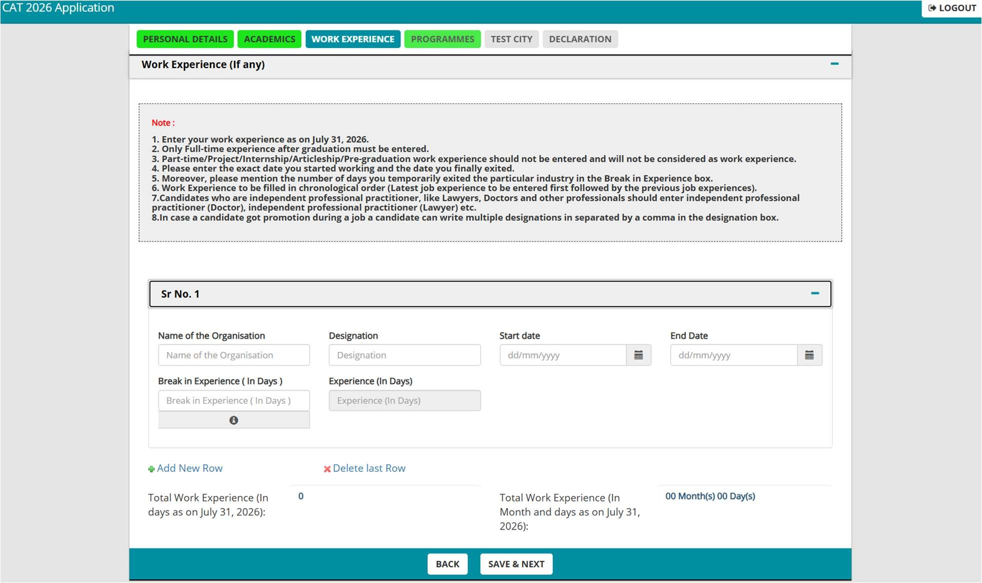
Select IIMs
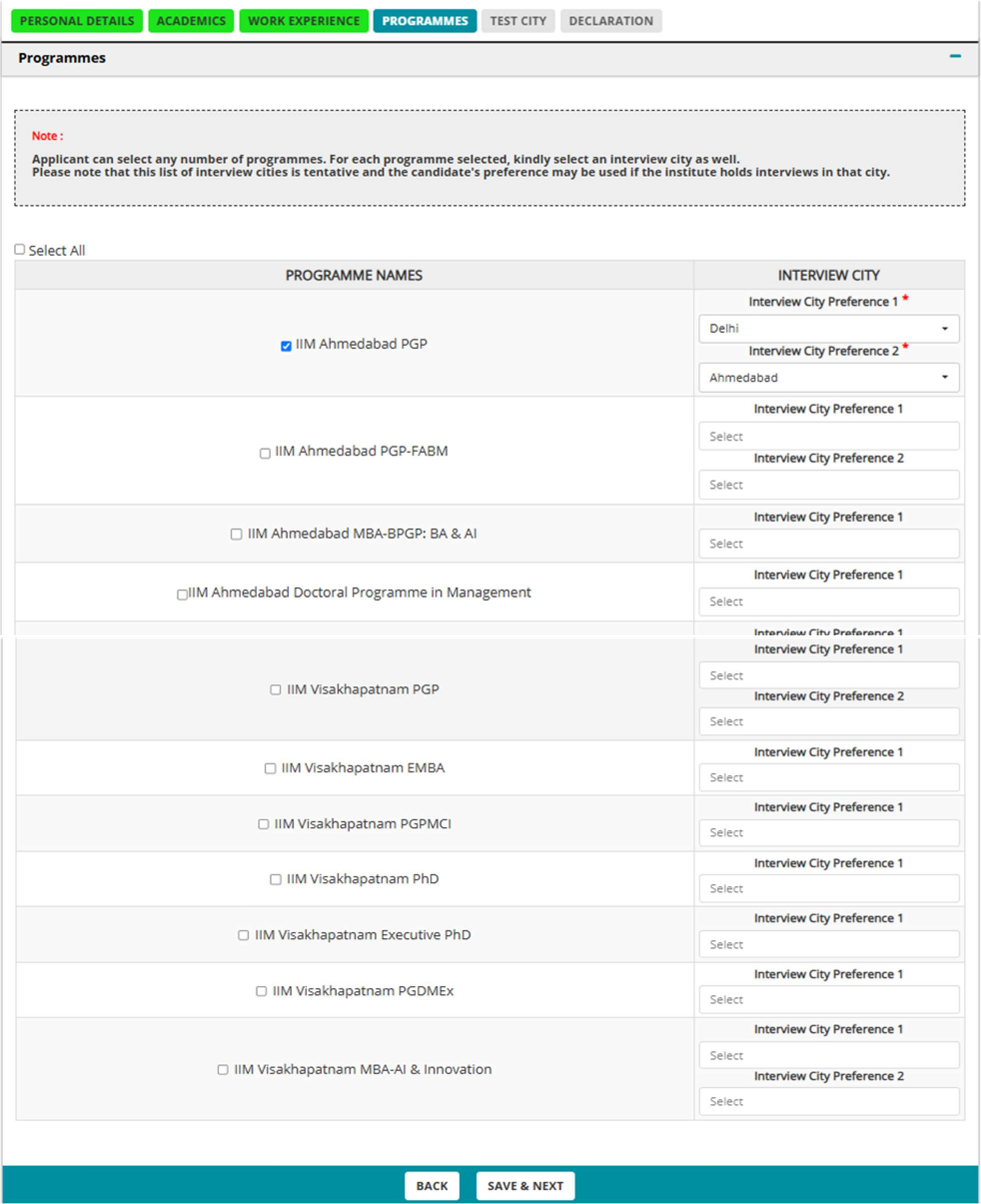
Next step is to enter IIMs and their programs that you wish to apply to. Since there is no additional fees and effort in applying for all IIMs, you should select all programmes by clicking on the “Select All” checkbox. Also select your Interview City preference from the respective drop-down list. Refer image from CAT 2026 application form below. Click on “SAVE & NEXT” button to proceed to the next section.
Refer image of CAT 2026 application form below. Click on “SAVE & NEXT” button to proceed to the next section.
Enter IIM “PROGRAMMES” Details
Enter CAT Test City
Next, you should enter your preferred CAT Test City where you will like to take the CAT exam. Candidates have to fill 5 different Test Cities as per your preference from the drop-down menu. New in the CAT 2026 Form: Candidates have to also select the “State” matching each of the five test cities. After the last date of registration, one among the 5 preferred test cities will be allotted subject to availability. In rare cases, if an Applicant is not allotted to any of the preferred test cities, Applicant will be allotted to a nearby test city. Refer image of CAT 2026 application form below. Click on “SAVE & NEXT” button to proceed to the next section. list of CAT Exam Centres 2026.
Enter CAT Test City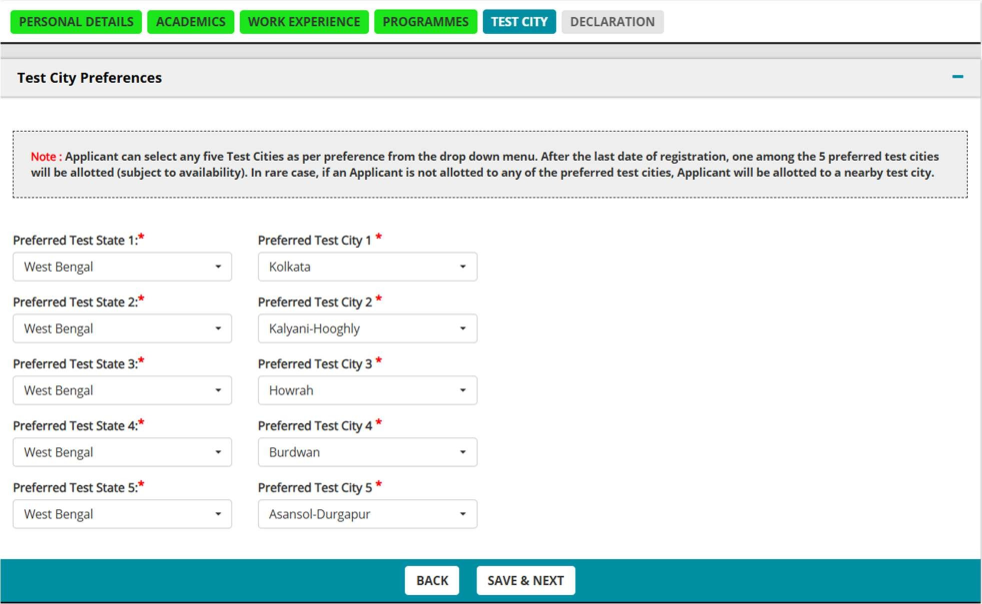
Pay Fees and Sign Declaration
CAT 2026 Registration is closed as the last date to register for CAT 2026 exam was September 22 (5:00 PM). CAT 2026 Fee Payment is also closed as the last date and time was September 24 till 5:00 PM.
The final step of CAT application form filling is to pay CAT exam fees and sign declaration form. CAT registration 2026 fees for General/EWS/NC-OBC candidates is Rs. 2,700. CAT registration 2026 fees for SC/ST/PwD candidate is Rs. 1350. Before proceeding with the payment, carefully read the transaction charges as per the table displayed on form. Payment by UPI is the best option, as there are no extra charges. Payment by Net Banking has extra changes. Candidates must sign a declaration confirming that all details submitted in the application form are correct, and you will produce supporting certificates and documents when required. During this stage, it is important to preview the application form, using the ‘PREVIEW’ button to check for accuracy and completeness of your data.
After successful fees payment, a ‘Payment Successful’ message will be displayed on the screen along with the Payment Transaction Number. Please keep it saved for future references. Next, you will receive a confirmation email stating the successful submission of your CAT 2026 Application. With this step, your CAT Online form filling process is completed.
Pay Fees and Sign Declaration
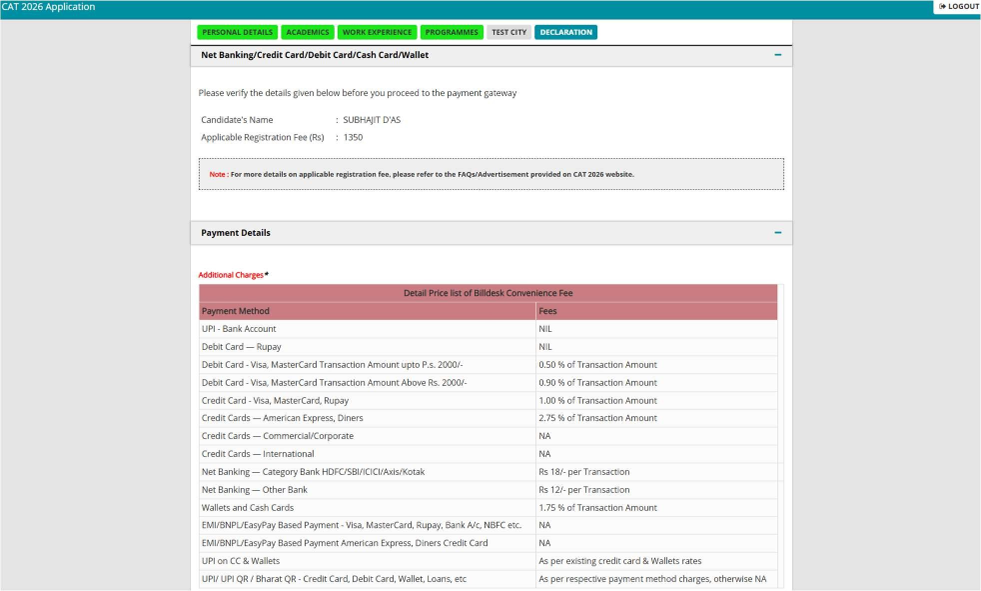
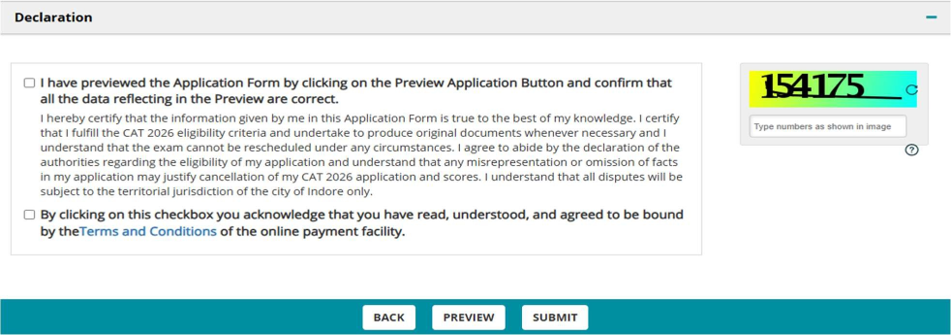
Application Confirmation & Download Application Form
After completing above steps, you will also receive a confirmation email and SMS stating the successful submission of your CAT 2026 Application within a few minutes. The email may also contain communication on additional details such as Admit Card download window.
Application Summary will be available whenever you login to the CAT 2026 application form as a Registered User. This is a Read-only view of the details you have entered.
After submitting your application upon login to the CAT 2026 application form as a Registered User, you will see the Download Application tab from where you can download the application details provided by you. Download it, and save it in your CAT 2026 folder.
Following documents will be required during the CAT 2026 form filling process. Candidates must keep them ready before starting application form filling. Check more details about academic qualifications in the following section:
- Class 10 marksheet
- Class 12 marksheet
- Graduation marksheets/certificate
- Date of Birth certificate
- Address proof
- Final year certificate from principal, HoD or Director (if applicable)
- Caste category certificate (if applicable)
- PwD category certificate (if applicable)
- Scribe certificate (if applicable)
- Credit/debit card or net banking credentials
- Work experience document
While filling CAT 2026 form candidates should fill following educational qualification in detail, as given below:
- SSC/10th/Equivalent Details
- HSC/12th/Equivalent/Diploma Course Details
- First Bachelor’s Degree Details
- Second Bachelor’s Degree Details
- Master’s Degree Details
- Professional Degree Details
Important Note regarding Percentage Calculations
If any Board/Institute/University awards only letter grades without providing an equivalent percentage of marks on the grade sheet, the candidate should obtain a certificate from the Board/Institute/University specifying the equivalent marks or the conversion procedure, and the conversion to percentage of marks would be based on this procedure as certified by the respective board/University/Institution. If any board /University/Institution confirms that there is no scheme for converting CGPA into equivalent marks, the equivalence would be established by dividing the candidate's CGPA by the maximum possible CGPA and multiplying the result with 100. The original equivalence certificate needs to be submitted at the time of interview, if shortlisted for the interview.
For computing percentages of marks obtained in SSC/10th/Equivalent examination and HSC/12th/Equivalent/Diploma examination, the total marks of all subjects that appear in the mark sheet/grade sheet would be considered irrespective of the Boards regulation. For graduates and postgraduates, the aggregate percentage of marks awarded by the Board/Institute/University will be treated as final. If the Institute/University does not award the aggregate percentage of marks, it will be calculated based on the marks obtained in all subjects listed in the mark sheet.
SSC/10th/Equivalent Details
For computing percentages of marks obtained in SSC/10th/Equivalent examination, the total marks of all subjects that appear in the mark sheet/grade sheet would be considered irrespective of the Board’s regulation. In Aggregate Percentage, you can specify your converted CGPA/percentage of marks obtained marks up to 2 decimals.
If you have completed your SSC/10th/Equivalent in the year 2020/2021 and haven’t received results or have been promoted/passed without marks, then you can mark the flag ‘Promotion/Pass without Marks’ to proceed further with the application form. *Only valid for candidates passing out in 2020/2021*
HSC/12th/Equivalent/Diploma Course Details
Select Course Type as 12th/Equivalent if you followed the HSC or school structure of two-year education post 10th standard, else select Diploma.
Enter all the relevant details. For computing percentages of marks obtained in 12th/Equivalent/ Diploma examination, the total marks of all subjects that appear in the mark sheet/grade sheet would be considered irrespective of the Board’s regulation.
In Aggregate Percentage, you can specify your converted CGPA/percentage of marks obtained marks up to 2 decimals.
If you have completed your HSC/12th/Equivalent/Diploma Course in the year 2020/2021 and haven’t received results or have been promoted/passed without marks, then you can mark the flag ‘Promotion/Pass without Marks’ to proceed further with the application form. *Only valid for candidates passing out in 2020/2021*
First Bachelor’s degree Details
When filling CAT form, please select the appropriate qualifying degree from the drop down. Enter the details based on whether you are currently pursuing a Bachelor’s Degree or have completed your Bachelor’s Degree.
- If you selected “Yes”, for Are you in the final year of Bachelor’s Degree? enter the current year and semester of education. Enter the aggregate percentage of marks obtained for the years/semesters of the degree course completed to date.
- If you hold a Bachelor’s Degree, compute the aggregate percentage of marks obtained as per the norms of the University/Institution. If no norms exist, enter the aggregate percentage of marks obtained for all years/semesters of the degree course.
- If you have completed your Bachelor’s Degree in the year 2020/2021 and have been promoted/passed without marks by your University/Institution, then you can mark the flag ‘Promotion/Pass without Marks’ to proceed further with the application form. *Only valid for candidates passing out in 2020/2021*
- If you have more than one bachelor’s degree then select the check box “Click here if you are currently in the final year of, or have already completed, another Bachelor’s Degree” and fill the details for both the bachelor’s degrees.
Candidates should note that if you have a dual degree with both a Bachelor's and a Master's (BTech + MTech or BTech + MSc) enter the appropriate details in both the bachelor’s and master’s degree sections.
Master’s Degree Details
If you choose to enter your master’s degree details, then select if you are currently pursuing it or have completed it and enter the relevant details as mentioned in the form.
Professional Degree Details
Please select the professional degrees that you have obtained from the list of professional degrees such as FIAI, CA, ICWA (CMA), CS etc.
However, enter aggregate percentage only for the degree to which you have scored the maximum.
Candidates should note that if you have not undergone any bachelor’s degree, then completion of any one of the above professional degrees is mandatory.
Candidates should also note that originals of all mark sheets will be required at the time of interview.
Will CAT 2026 Registration Last Date Be Extended Further?
No. Since CAT 2026 registration deadline has already been extended once to September 22, 2026, any further extensions will not happen. CAT 2026 Official Notification says: “Under no circumstances, the September 22, 2026 deadline will be extended.” Check notification below. CAT Exam Fees Payment Last Date is September 24, 2026 till 5:00 PM. Check CAT exam deadlines extensions in past years in the table below. Also read detailed article on: Will CAT 2026 Registration last date be extended?
| CAT Year | Original Registration Last Date | Extended Registration Last Date |
|---|---|---|
| CAT 2026 | September 15, 2025 | September 22, 2025 |
| CAT 2025 | September 13, 2025 | September 20, 2025 |
| CAT 2024 | September 13, 2024 | September 20, 2024 |
| CAT 2023 | September 13, 2023 | September 21, 2023 |
| CAT 2022 | September 14, 2022 | September 21, 2022 |
| CAT 2021 | September 15, 2021 | September 22, 2021 |
Official IIM CAT Notification for CAT 2026 Fees Payment Last Date
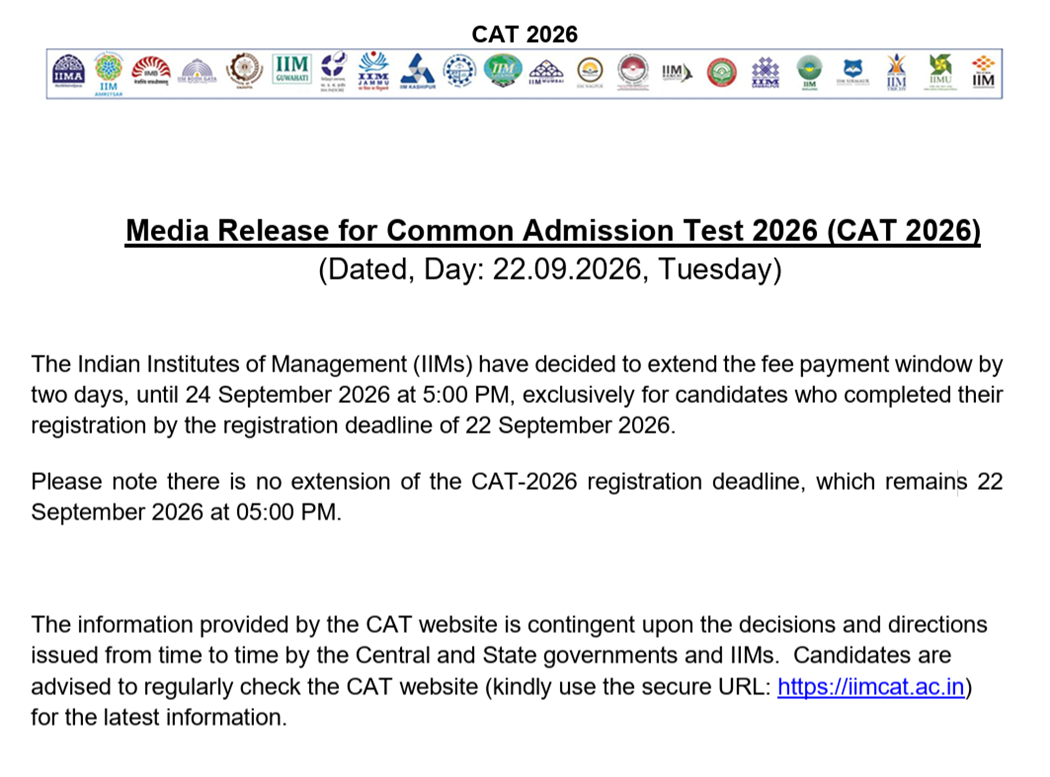
CAT Form Correction Window 2026 is expected to open soon in the last week of September 2026. Based on last years’ trends, CAT Form Correction Window 2026 is expected to be open from September 26–29. CAT 2026 Form Correction window will allow candidates to correct specific errors before the CAT 2026 Admit Cards are generated. Unlike other entrance exams, IIMs are extremely strict with what changes are allowed in the CAT application form. You cannot change your personal details, academic marks, or work experience. During the CAT form correction window 2026, you can change only the following fields:
- Photograph: If your original upload was blurry or had a non-white background.
- Signature: If the signature was illegible or cropped incorrectly.
- Test City Preferences: You can re-prioritize your choice of 5 preferred exam cities.
To make changes in your CAT Admission Form, candidates have to log in to their account on CAT official Website. Read how to edit CAT form below:
- Visit CAT exam website iimcat.ac.in
- Click on ‘login’ tab
- Enter User ID and password
- Login to go to dashboard
- Click on ‘Application Form’ option
- Go to relevant section (photo, signature, test city) and edit it
- Enter CAPTCHA code and click on ‘continue’ to complete the process
Note that there is no fee for CAT form correction during the CAT Registration Form Edit Window 2026
While filling CAT registration form you should be careful to avoid errors. Here are the most common CAT 2026 registration mistakes you must avoid:
- Wrong Name Entry: Enter your name exactly as it appears on your Class 10 / SSC certificate. Any mismatch can cause issues at the admit card and exam centre stage.
- Invalid or Shared Email ID: Use a valid, unique, and personally accessible email address. A shared or incorrect email will mean you miss critical login credentials and communication from IIM.
- Incorrect Category Selection: Select your category — General, EWS, NC-OBC, SC, ST, or PwD — with extreme care. No change in category is permitted after CAT registration under any circumstances.
- Not Uploading Category Certificate: SC, ST, NC-OBC, EWS, and PwD candidates must upload their certificate at the time of registration itself. Failure to upload will result in rejection of CAT registration.
- Blurry or Incorrect Photograph: Upload a recent passport-size photograph with a white background. A blurry or incorrectly formatted photo is one of the most common reasons candidates need to use the correction window.
- Entering Part-Time Work Experience: Only full-time post-graduation work experience must be entered. Internships, projects, articleship, and pre-graduation experience are not counted by IIMs and must not be entered.
- Selecting Wrong Test Cities: Choose your 5 preferred test cities carefully. Once the registration window closes, city preferences can only be changed during the short correction window. After that, no change is permitted.
- Rushing Through the Form: Once submitted, CAT application data cannot be changed. Review every section carefully using the PREVIEW button before making the fee payment.
- Waiting Till the Last Day: Heavy server traffic near the deadline can cause technical difficulties. The CAT Convener specifically urges candidates to register well in advance to avoid last-minute issues.
In the event you do not receive a Confirmation email after completion of the application process or for queries regarding CAT Registration, Application and Payment Processing, Document uploading, you can raise a ticket on the Grievance Portal. Grievance Portal is available for all registered candidates through the Registered Candidate Login (available as a separate Tab inside the application login).
Check image of CAT 2026 Grievance Portal below. Click on “+” button on the right-hand corner to initiate a ticket. Select applicable options from the dropdown and provide clear description of your query. Candidates can also upload up to 3 supporting documents for the query. Kindly wait for at least 2 working days to receive a response on your ticket.
You can also call on 1-800-210-0175 (Toll Free), Monday to Saturday 9:00AM to 6:00PM (excluding National holidays). Please have your User ID and/or Payment Transaction Number details handy for reference.
For Academic queries like eligibility, category and PwBD certificate, please contact CAT Centre office by email ([email protected]) or call +91 7312439402. CAT Centre should NOT be contacted for any issue related to CAT registration, application, or payment processing.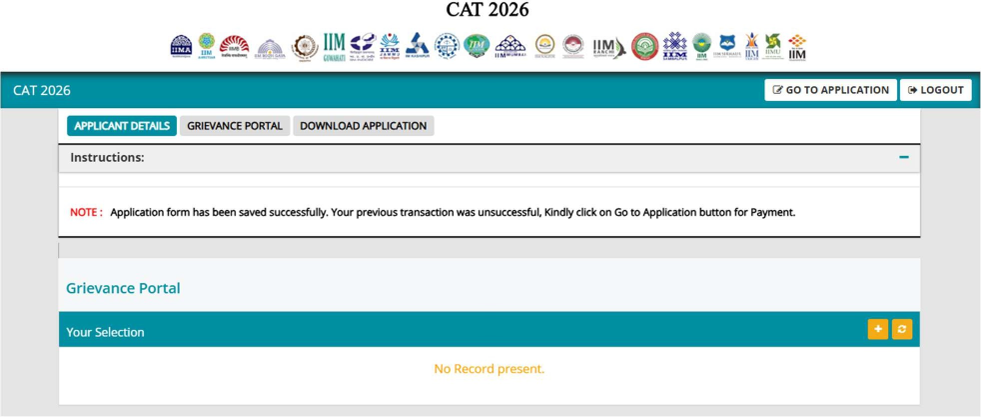
After completing your CAT 2026 registration, the next step is to begin focused preparation. Whether you are starting from scratch or already deep into your CAT preparation, MBAUniverse.com offers a complete suite of free resources to help you go from registration to a 99+ percentile. Use the links below to access all the essential CAT 2026 preparation tools.
- CAT Exam Pattern 2026 — Complete section-wise breakup of CAT 2026 with 68 questions across VARC, DILR, and QA, marking scheme (+3/–1), sectional time limits, and last 5 years' pattern evolution.
- CAT Syllabus 2026 — Detailed section-wise topics for VARC, DILR, and QA along with 5-year topic-wise weightage analysis (Arithmetic 38%, Algebra 34%, RC 67% of VARC) based on CAT 2021–2025 papers.
- CAT Preparation 2026 — Complete 6-month preparation roadmap (May to November 2026), section-wise strategy, best books (Arun Sharma, Nishit K. Sinha), and topper tips from IIM Ahmedabad, IIM Calcutta, and IIM Kozhikode students.
- CAT Mock Tests 2026 — Take 20+ free full-length CAT mock tests based on the last 10 years of actual CAT papers. Each mock simulates the actual CAT 2026 interface with sectional time locks and detailed performance analysis.
- CAT Previous Year Question Papers — Free downloadable CAT papers from 2017 to 2025 with detailed solutions for all three sections. The most authentic source to understand real CAT difficulty level.
- CAT Sample Paper 2026 — Free CAT 2026 sample papers designed on the latest exam pattern. Ideal for early-stage aspirants getting familiar with CAT-style questions.
Read these common CAT registration 2026 myths for a hassle-free application form filling experience.
Myth 1: Early Registration Improves Your IIM Chances
Reality: CAT slot or registration sequence has no impact on your percentile or IIM shortlisting. All slots are Normalized.
Myth 2: Later Slots Are Disadvantaged in Normalization
Reality: CAT uses robust statistical normalization across all slots. No slot is harder or easier by design.
Myth 3: You Must Complete the Form in One Go
Reality: You can save and resume your application. It’s better to review, gather documents, and fill accurately than to rush.
Myth 4: Registering Early Gets You a Better Test City
Reality: This is partly true. Test city allotment is based on availability. So earlier registrants have a better chance of getting their preferred center.
CAT 2026 Registration closed on September 22, 2026. CAT 2026 Fee Payment Window also closed on September 24, 5:00 PM. Next, a short CAT Form Correction Window 2026 will open in last week of September to allow candidates to edit only photograph, signature and the 5 test-city preferences. Check how to correct mistakes in your CAT exam Form below. Candidates should now seriously prepare for CAT Exam on Nov 29, 2026 by using free expert resources on MBAUniverse.com: CAT 2026 Preparation Guide, CAT Mock Tests 2026 and CAT Sample Papers 2026. Explore all other MBA entrance exams with registrations open including XAT 2027, SNAP 2026, NMAT 2026. For Reference, read this step-by-step guide that covers the CAT registration 2026 direct link, dates, fees, documents required, the form-filling process, common mistakes to avoid, and a lot more. CAT 2026 exam will be held on Sunday, November 29, 2026 in three shifts.